Bug #642
openx201t Turbo boost not working, CPU running hot
0%
Description
Hello, i installed Coreboot on my x201t but turbo boost isn’t working and cpu won’t go past 2.1 GHz. My processor is an i7 640LM. Something i also noticed is that the system runs hotter with coreboot than with stock bios but i don’t know what’s causing that.
Files
PR Updated by Patrick Rudolph 6 months ago
- Related links updated (diff)
PR Updated by Patrick Rudolph 6 months ago
- Related links updated (diff)
Are C-states properly working? If not that would explain high temperature and non working turbo mode.
Can you please share full coreboot + kernel log?
What does powertop say? Does the CPU enter C1-C7 states?
Looking at the code I don't see configure_c_states() in the CPU driver, which might cause C-states to be disabled.
JN Updated by Janez Novak 6 months ago
- File Coreboot Logs.md Coreboot Logs.md added
- File Kernel Logs.md Kernel Logs.md added
- File Powertop Screenshot.png Powertop Screenshot.png added
Patrick Rudolph wrote in #note-2:
Are C-states properly working? If not that would explain high temperature and non working turbo mode.
Can you please share full coreboot + kernel log?
What does powertop say? Does the CPU enter C1-C7 states?Looking at the code I don't see configure_c_states() in the CPU driver, which might cause C-states to be disabled.
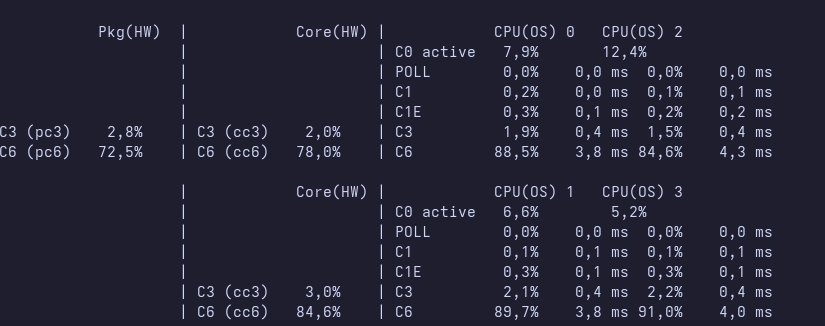
I have attached coreboot and kernel logs. It seems like the CPU does enter some C states but it doesn't enter C7. There is a screenshot of powertop idle stats tab attached.
PR Updated by Patrick Rudolph 6 months ago
Is this with current coreboot main branch?
It says intel_pstate: CPU model not supported and on main there are no ACPI tables containing _CST. So C-states should not work at all.
I've written https://review.coreboot.org/c/coreboot/+/92503 to fix that.
It's possible that the package only supports C6 as deepest sleep state. C7 is special and only works on some mainboards.
Also C7 might only be supported with intel_pstate driver as you can only advertise 3 different C-states in ACPI, usually C1, C3 and C6.
Since C-states are generally working it's probably not the issue why turbo doesn't work.
PR Updated by Patrick Rudolph 6 months ago
Nehalem and older doesn't use the intel_pstate driver, but only acpi-cpufreq. Thus _CST generation is important for such older platforms.
JN Updated by Janez Novak 6 months ago
Patrick Rudolph wrote in #note-4:
Is this with current coreboot main branch?
It saysintel_pstate: CPU model not supportedand on main there are no ACPI tables containing _CST. So C-states should not work at all.I've written https://review.coreboot.org/c/coreboot/+/92503 to fix that.
It's possible that the package only supports C6 as deepest sleep state. C7 is special and only works on some mainboards.
Also C7 might only be supported with intel_pstate driver as you can only advertise 3 different C-states in ACPI, usually C1, C3 and C6.Since C-states are generally working it's probably not the issue why turbo doesn't work.
Yes i am using the main branch. If anything needs to be tested please let me know. I also attached my .config now.
PR Updated by Patrick Rudolph 6 months ago
Does https://review.coreboot.org/c/coreboot/+/92503 make a difference in the behaviour?
JN Updated by Janez Novak 6 months ago
- File Coreboot Logs New.md Coreboot Logs New.md added
- File Kernel Logs New.md Kernel Logs New.md added
Patrick Rudolph wrote in #note-7:
Does https://review.coreboot.org/c/coreboot/+/92503 make a difference in the behaviour?
It doesn't seem to change anything. System is still running hot, idle stats tab in powertop is unchanged and turbo boost doesn't work.
JN Updated by Janez Novak 6 months ago
I have now flashed the stock BIOS and C states didn't change in powertop at all but it runs much cooler even with turbo boost enabled than it does with coreboot. With coreboot when idle CPU temperatures usually wouldn't drop below 60c while with stock BIOS they are at around 46c. Under light load it's also much better now, with coreboot when web browsing and having a few other applications opened it could go past 75c while now it's at around 50c.
WS Updated by Walter Sonius 6 months ago
It was common for a while to report ongoing coreboot bugs in the release notes ~25.03, therefor a existing bug#439 may have missed our attention but still confirms your current observation of missing turbo.
About the high(er) temperatures, did you manually disable ME after running coreboot in IFD or cmos/cfr option or using a (over)cleaned ME, your current config file doesn't resemble this but you may have flashed it with --ifd -i bios while already having a cleaned ME?
Running coreboot especially with (over)cleaned ME on my x201 disabled all auto FAN behavior in worst case it is 100% silent until CPU reaches ~100 degrees and only than it will start spinning at high RPM until it reaches a certain threshold and just stops again. Replacing the cool paste, I was able to keep it idle at 35 degrees without any FAN spin up on coreboot. To keep normal FAN behavior don't touch the ME. Using the m520 CPU a while ago I noticed that it can go to 60~70 degrees while using on intense website but would go back to 45 degrees with simpler websites.
Did you do any manual FAN tuning on OEM BIOS on the linux distribution you were running with tools like thinkfan, these older settings may need to be changed. Did you record RPM FAN speed differences besides the temperature differences?
PR Updated by Patrick Rudolph 5 months ago
I'm not sure what else is missing.
On newer platforms BIOS_RESET_CPL needs to be written before CPU frequency can be changed and turbo is working.
I don't see that on Nehalem.
In general the code base is less maintained than newer platforms are.
It could be difficult to figure out what's missing.
You could do from Linux. Boot in vendor UEFI/BIOS and then flash coreboot and:
- Dump all MSRs
- Dump MCHBAR and PCI registers of 0:0.0 (using inteltool)
and compare it for differences.
Then try to write the same register values in coreboot until turbo works.
JN Updated by Janez Novak 5 months ago
Walter Sonius wrote in #note-10:
It was common for a while to report ongoing coreboot bugs in the release notes ~25.03, therefor a existing bug#439 may have missed our attention but still confirms your current observation of missing turbo.
About the high(er) temperatures, did you manually disable ME after running coreboot in IFD or cmos/cfr option or using a (over)cleaned ME, your current config file doesn't resemble this but you may have flashed it with
--ifd -i bioswhile already having a cleaned ME?Running coreboot especially with (over)cleaned ME on my x201 disabled all auto FAN behavior in worst case it is 100% silent until CPU reaches ~100 degrees and only than it will start spinning at high RPM until it reaches a certain threshold and just stops again. Replacing the cool paste, I was able to keep it idle at 35 degrees without any FAN spin up on coreboot. To keep normal FAN behavior don't touch the ME. Using the m520 CPU a while ago I noticed that it can go to 60~70 degrees while using on intense website but would go back to 45 degrees with simpler websites.
No, i didn’t manually disable ME. When first flashing i used me_cleaner to neutralise it before flashing and disabled the option to clean it in coreboot config but that made the fan not spin at all and the laptop didn’t seem to turn on. I have then not used me_cleaner and also disabled the option to neutralise it in config.
Did you do any manual FAN tuning on OEM BIOS on the linux distribution you were running with tools like
thinkfan, these older settings may need to be changed. Did you record RPM FAN speed differences besides the temperature differences?
No, i didn’t do any manual fan tuning before. I didn’t record RPM differences yet but it seems to be using the stock BIOS fan curve. Temperatures are definitely not higher because of lower fan speed. Fan is working normally and is keeping up with CPU temperature.
JN Updated by Janez Novak 15 days ago
- File temperature_coreboot.png temperature_coreboot.png added
- File temperature_oembios.png temperature_oembios.png added
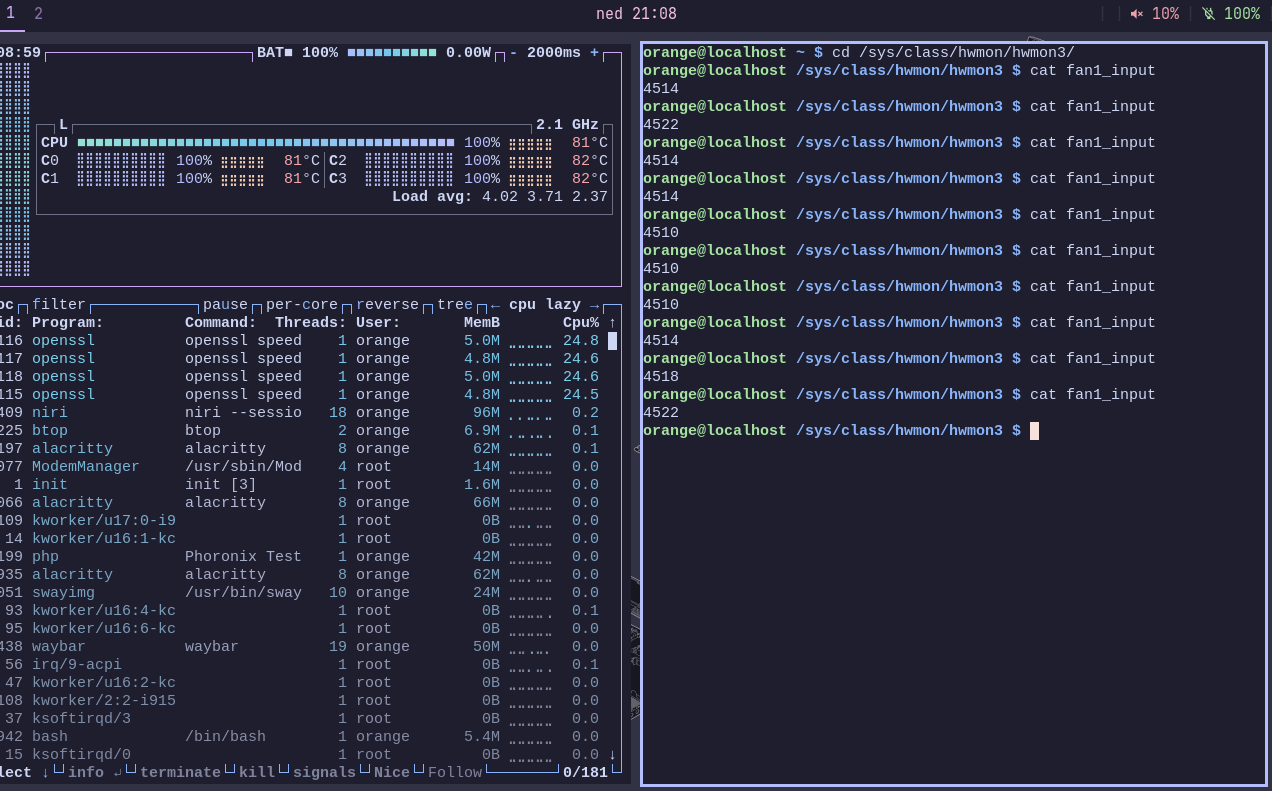
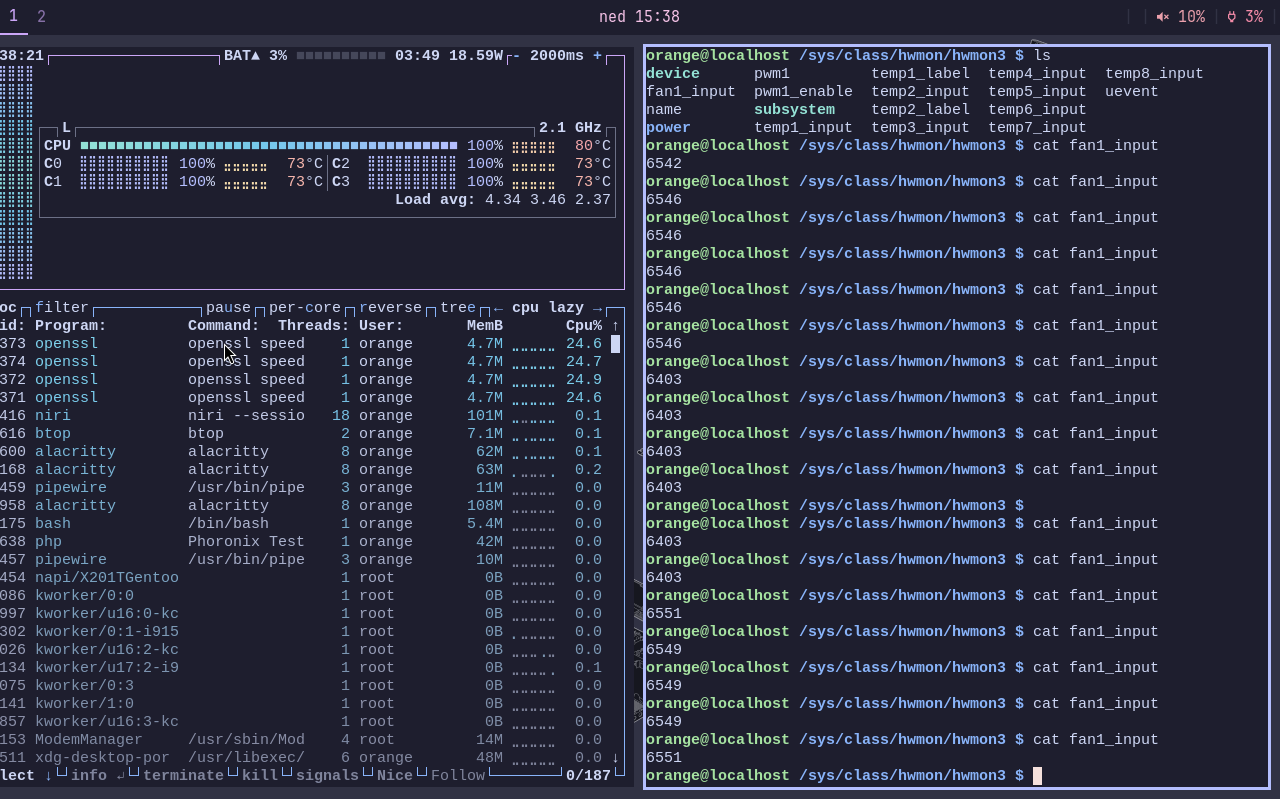
I have been using coreboot on the laptop again for a few months, but because of the fan noise and worse performance, I had to flash OEM BIOS again. Today I ran the same benchmark with both coreboot and OEM BIOS with turbo boost disabled, and the benchmark score was the same, but with coreboot, cores were around 7°C colder than the whole package, while with the OEM BIOS, package and cores were usually at the same temperature. Package temperature was the same, but with coreboot fan had to run around 1900 RPM faster to keep the same package temperature as the OEM BIOS, which probably means that with coreboot CPU or something else in the package is generating more heat while doing the same work. I have attached two screenshots that were taken in the middle of the benchmark with coreboot and OEM BIOS.